
Overskill Pricing Explained: What You Actually Pay for Each Plan
 Reading Time: 8 minutes
Introduction
If you have been reading about Overskill or thinking about joining Overskill Games, you have probably run into a pretty normal question. How much does this actually cost once the free stuff runs out? That is exactly what this article is for.
Overskill runs on a credit system, with a handful of monthly plans sitting on top of it. There is also a separate credits marketplace, a way to charge your own customers for AI features, and standard payment processing fees. This article walks through every number shared about Overskill pricing, plain and simple, so you know exactly what you are looking at before you commit to anything.
The Four Main Plans
Overskill’s plans page lists four tiers, plus a separate enterprise option. Each one is built around monthly credits, since credits are what get used up whenever the AI builds or edits your app.
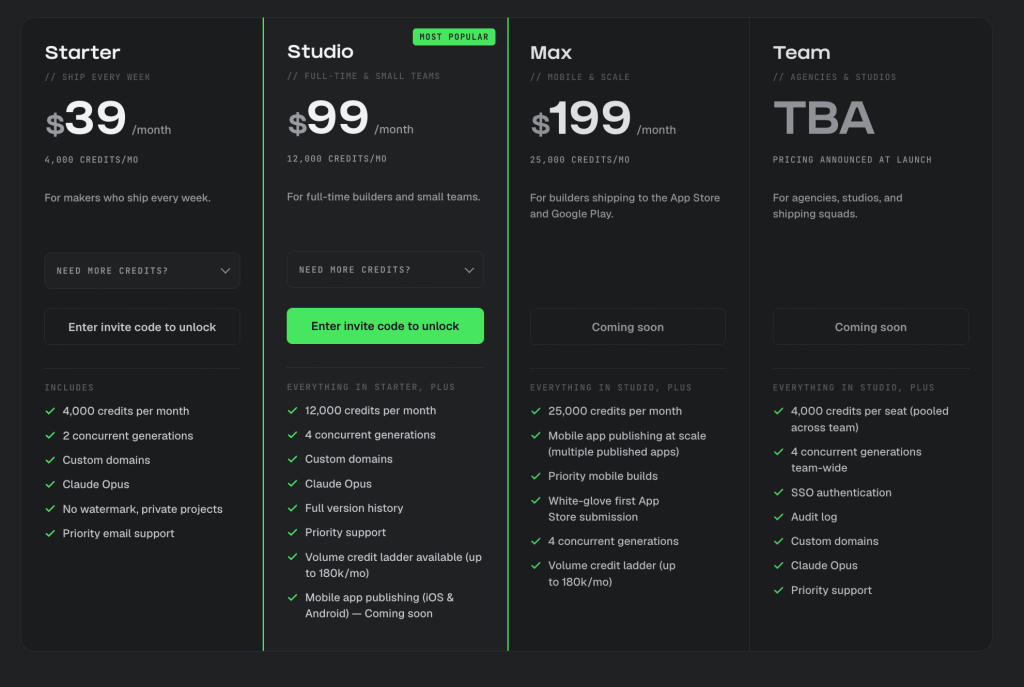
The Starter plan costs $39 a month, or $32 a month if you pay annually, which saves 17%. It comes with 4,000 credits a month, 2 concurrent generations, custom domains, access to Claude Opus, no watermark on your apps, private projects, and priority email support. This plan is described as being for people who ship something every week.
The Studio plan costs $99 a month, or $82 a month billed annually, and is marked as the best value option. It includes 12,000 credits a month, 4 concurrent generations, and everything in Starter, plus full version history and priority support. This one is aimed at full-time builders and small teams. Mobile app publishing for iOS and Android is listed here too, but marked as coming soon rather than available right now.
The Max plan costs $199 a month, or $165 a month annually, and is built for people shipping to the App Store and Google Play. It includes 25,000 credits a month, priority mobile builds, and white-glove help with your first App Store submission. This entire plan is marked as coming soon.
The Team plan does not have a set price yet. It is listed as TBA, meaning to be announced, and is also marked as coming soon. It is described as including 4,000 credits per seat, pooled together across your whole team, along with SSO authentication, an audit log, custom domains, and priority support.
There is also an Enterprise option for larger organizations, offering custom credit allocations, dedicated support with a service level agreement, SSO and audit logging, white-label options, help with procurement and security review paperwork, and volume-based pricing. This one requires contacting sales directly rather than picking a plan online.
Buying Extra Credits When You Need More
If your monthly credits run out before your next refill, each plan has its own set of extra credit packs you can buy on top.
On the Starter plan, you can add 2,000 credits for $19, 5,000 credits for $39, or 10,000 credits for $69.
On the Studio plan, the add-ons get bigger. You can add 30,000 credits for $249, 55,000 credits for $449, 90,000 credits for $749, or 180,000 credits for $1,499. The Max plan uses this exact same set of add-on options as Studio.
Here is something worth flagging honestly. A separate comparison page describes this same top-tier add-on differently, mentioning a volume ladder going up to 250,000 credits a month at $1,499, instead of the 180,000 credits figure shown on the main plans page. Both numbers come directly from the material, so there does appear to be some inconsistency between how this top tier gets described in different places.
A Second Signup Page With Slightly Different Numbers
Worth knowing about too is a separate signup page that lists Overskill pricing a little differently than the main plans page. On this version, the Pro plan is $39 a month with 4,000 credits, the Studio plan is $99 a month with 12,000 credits, and the Team plan is listed at $59 per seat rather than TBA. This page also mentions the model being used as Claude Opus 4.8 specifically, rather than just “Claude Opus.”
This same page shows only 17 builders waiting for access, while the Overskill Games signup page mentions 4,324 builders waiting. Since both numbers come straight from the material, it is possible these are two different versions of the signup flow, or they were captured at different points in time. Either way, it is worth double-checking current numbers directly on Overskill’s site before you commit to a plan, since the material itself is not fully consistent here.
The Free Plan
Before any paid plan, there is also a free tier. It comes with 500 credits per month. A billing dashboard example shows a balance of 550 credits, which breaks down as the standard 500 monthly credits plus a one-time 50 credit bonus labeled as a “waitlist tier bonus.”
This same dashboard shows a few other things worth knowing. There is a section tracking credits used that month, a note on when your next credit replenishment happens, and quick action buttons to buy credits, view all plans, grab starter bundles, or check a usage dashboard. There is also an auto top-off feature, letting you automatically refill credits once you run low, plus a credit history log and an invoice history section for tracking past charges.
What a Credit Actually Buys You
Since everything here revolves around credits, it helps to know what a credit actually pays for. Credits get used up whenever the AI generates or edits your app. A small change is roughly 100 credits, while building out a full new feature usually runs somewhere between 300 and 800 credits.
One detail worth knowing is that errors and retries still use up credits. Building with AI is naturally back-and-forth, so some generations do not work perfectly the first time and need a follow-up before they are right. That follow-up still costs credits, even though the first attempt did not give you what you wanted.
There is also a general tip shared in the material about stretching your credits further. Editing something you have already built is described as almost always cheaper than rebuilding it completely from scratch, so it is usually worth trying to fix or extend an existing app before starting over on a brand new one.
Charging Your Own Customers Through Buyer Credits
Beyond your own plan, Overskill has a separate system called buyer credits, aimed at people building apps that other people will actually use. If your app includes AI features, like text generation, image tools, voice features, research tools, or document handling, you can set an included credit allowance for your customers, along with your own markup on top of the cost.
Their usage draws down that allowance at whatever markup you set, and it resets every billing period. When they run out, they either top up or upgrade, and that extra revenue goes to you. The material points out that your heaviest users can end up becoming your most profitable ones under this setup, since more of their usage means more markup revenue for you.
Payment Processing Fees
If you plan to actually sell something through an app you build, there is one more cost to know about, the fees for processing customer payments. The material states that Overskill only passes through standard processor fees, without adding any extra platform fee on top of that.
Domestic card charges run about 2.7% plus 30 cents per transaction. Separate rates apply for international cards, ACH bank transfers, payouts, and disputes, though exact numbers for those specific categories are not given in the material. Volume discounts kick in for anyone processing more than $250,000 a month.
Billing Details Worth Knowing
A few smaller billing details are worth mentioning too. Choosing annual billing on any plan saves you 17% compared to paying monthly. If you upgrade or downgrade your plan, the change applies right away and gets prorated automatically, though unused credits do not roll over from month to month on any tier.
If you run out of credits before your next refill, you get a notification once you hit 80% of your monthly allowance. Once you hit zero, you can either upgrade your plan or grab a higher rung on your tier’s volume ladder, since generation pauses until you do one or the other.
For anyone on the Team plan, credits pool together across every seat. As an example given in the material, three seats on Team would combine into 12,000 credits a month that the whole team can pull from, and account owners can see usage broken down by seat and add more seats whenever needed.
And if you decide Overskill is not for you, cancelling is described as simple. Cancelling stops future renewals, but you keep paid access through the end of your current billing period.
Is Overskill’s Pricing Worth It?
Based only on what is shared, Overskill’s pricing sits above some of the cheapest AI app builders on the market, and the material is upfront about that being intentional, tied to using a more capable AI model that is meant to get things right on the first attempt rather than needing several rounds of follow-up prompts. Whether that is worth it really depends on how much you value getting a working result faster, versus paying less upfront and potentially needing more prompts, more time, or more patience to get there.
For anyone just testing things out, the free plan and its 500 monthly credits give you a way to try things before spending anything. And if you are joining through Overskill Games specifically, remember that the twenty-five dollar a month offer tied to prize eligibility comes with its own separate bonus of 9,500 credits, on top of whatever your regular plan already includes.
Frequently Asked Questions
What is the cheapest paid Overskill plan?
The Starter plan costs $39 a month, or $32 a month if billed annually, and includes 4,000 credits a month.
Which plan is considered the best value?
The Studio plan, at $99 a month or $82 a month annually with 12,000 credits, is specifically labeled as the best value option on the plans page.
Do unused credits roll over to the next month?
No. The material states that unused credits do not roll over between months on any plan tier.
What happens if I run out of credits mid-month?
You get a notification once you reach 80% of your monthly allowance. Once you hit zero, you need to either upgrade your plan or buy a higher credit pack from your tier’s volume ladder before you can keep generating.
Are there extra fees for taking payments through my app?
Yes, but only standard processor fees, with no extra markup added by Overskill. Domestic cards run about 2.7% plus 30 cents per transaction, with separate rates for international cards, ACH, payouts, and disputes.
Can I cancel my Overskill plan anytime?
Yes. Cancelling stops your plan from renewing, but you keep your paid access until the end of your current billing period.
